

Change a few words, leave the artwork untouched.
Update details on exported event flyers and printed cards without needing the Canva or design source file.


Update an event flyer without the Canva file
The artwork was only sent to you as a flattened JPG and one line changed before sharing. AI keeps the clean sans-serif weight, spacing, and surrounding illustration intact.
OCT 18 → NOV 15

Keep card tilt, shadows, and cotton paper grain
Photographed an already-printed invitation on a table? Replacement wording follows the exact perspective and textured surface of the cardstock.
OCT 18 - 20 → NOV 15 - 17When this is the right tool
You have the finished image but not the template: the designer is unavailable, the Canva file belongs to someone else, or the poster was only ever sent to you as a picture. You need one or two wording changes, not a redesign. For date and year changes, see Change the date in an image. For posters made by an AI image generator with misspelled text, see Fix text in AI-generated images.
How to edit poster text
Four quick steps right in your browser.
Upload the poster, flyer or invitation as JPG, PNG or WebP.
Type the words you want to replace, exactly as they appear.
Type the new wording.
Generate, compare, and download.
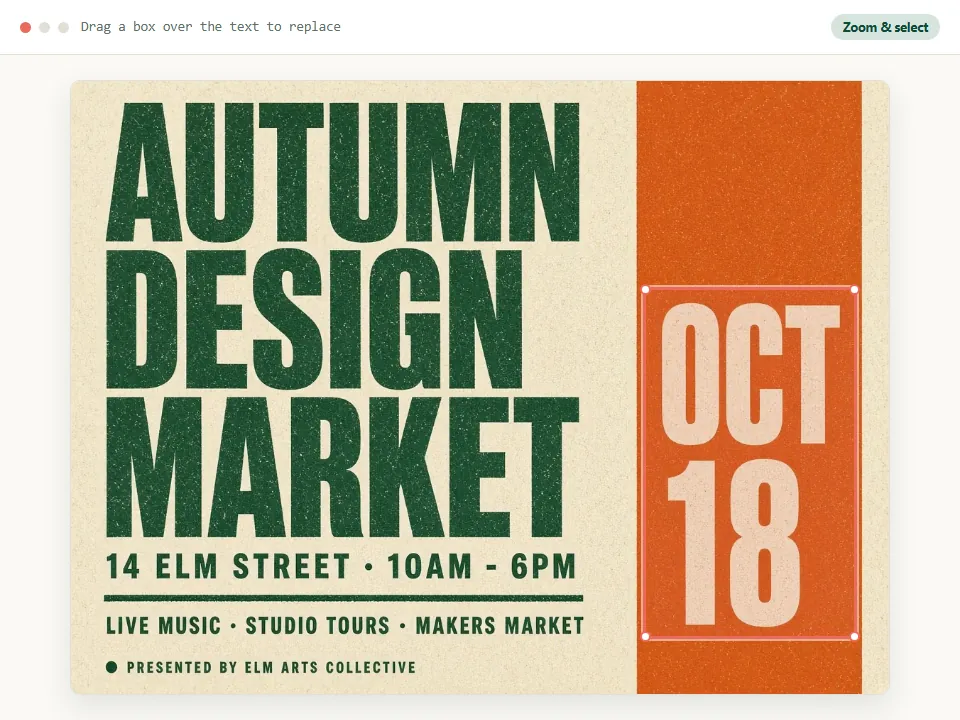
Lettering, length and print
What to expect with display fonts, gradients, and printed flyers.
Display and script lettering
The new words are drawn to match the look of the original lettering. It is a visual match, not the original font file, so letters that did not appear in the old wording are an approximation of the style.
Shorter vs longer headlines
Similar length gives the best fit. When replacing a long headline with a shorter one, keep centered alignment clean; much longer wording is scaled down to fit the same area and can look smaller than the original.
Headlines over two lines
Change one line at a time so line spacing, margins, and decorative borders stay balanced across the poster header without crowding nearby dates or artwork.
Text over photos and gradients
The background behind the old letters is rebuilt, so textured paper, photography, or color gradients continue cleanly under the new words without leaving solid color patches.
Canva and social exports
Ideal when a collaborator sent a finished PNG or JPG from Canva, Figma, or an agency and you only need to fix a speaker name, venue, room number, or offer line before posting.
Printing & resolution
Start from the largest file you have and inspect the edited lettering at full size before sending the flyer or poster to a print shop. Download as PNG to avoid extra compression on sharp type.
Use it on designs you are allowed to change
Edit your own posters and invitations, or ones you have permission to update. Do not use it on tickets, certificates or official notices. If an event moved to a new date or crossed into a new year, use our dedicated date replacement guide so the weekday, time zone, and RSVP lines stay consistent.
Questions about posters and flyers
Practical answers for Canva exports, brush lettering, and print resolution.
I only have the PNG downloaded from Canva. Can I still change the text?
Yes. That is the case this page is for. If you can open the original Canva design, changing it there is more exact.
Will it match a handwritten or brush font?
It draws the new words in the same hand-lettered look. Very irregular lettering may need a second try.
Can I replace a short headline with a longer sentence?
You can, but it will be fitted into the same space. For a much longer line, consider shortening the wording.
Is the result good enough to print?
The edited image keeps the size of the image you upload. Start from the largest version of the poster you have.
Ready to update your poster or flyer?
Upload your JPG or PNG and replace the headline, name, or venue in place.
JPG, PNG or WebP · Free to try · No watermark