

Update packaging and listing visuals in place.
Swap variant copy, fix typos behind foreground objects, or localize wording for another marketplace.


Update variant text on an angled kraft label
Launched a larger pack size and only had the studio pouch photo? AI matches the printed serif weight, subtle pouch angle, and paper grain so 500g sits cleanly on the label.
250g → 500g

Swap listing or packaging text into another language
Selling in a new region? Type the translated wording you already prepared, and the AI redraws it in the same vintage textured display lettering without breaking the illustration.
BAKERY → BOULANGERIEWhat sellers use it for
Update product photos, packaging mockups, and secondary listing images when only the flattened export exists.
Every product photo edit redraws only the text region while keeping lighting, reflections, and packaging grain untouched. Updating a price or promo discount instead? Or matching an unusual display typeface?
How to edit product image text
Four steps with no PSD or Illustrator file required.
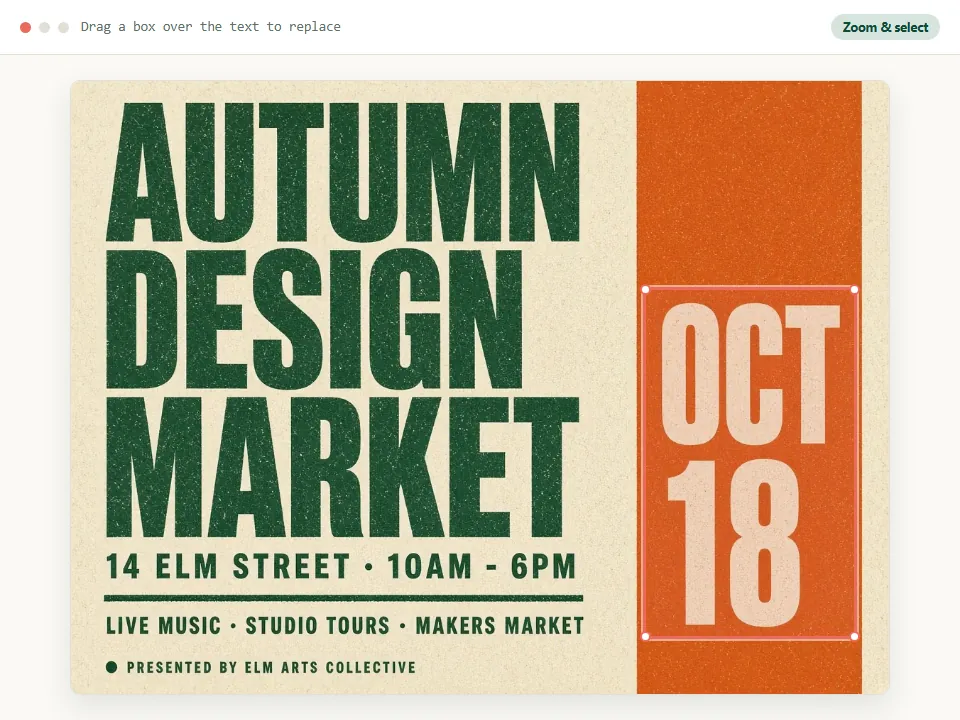
Upload the product photo or mockup.
Type the wording exactly as printed, including capital letters.
Type the replacement wording.
Generate, check it against the original, and download.
What works well and what does not
Know where AI inpainting shines on packaging and where the source design file is still needed.
Works well
Flat or gently curved labels, callout text on infographics, printed taglines, and text on matte, kraft, or glossy packaging surfaces.
Keep the length close
Replacement wording of similar length sits best inside badges, icons, and label panels without colliding with borders or product edges.
One phrase per edit
For a label or listing infographic with several callout lines to change, update them one after another so each badge stays sharp and well-spaced.
Same word in two places?
When a flavor name or badge appears twice on a front-and-side box shot, drag a selection box around the instance you want changed so only that copy updates.
Marketplace review standards
Amazon, Etsy, and Shopify store owners often update secondary infographics when specs, warranty terms, or regional copy change. Keep main images clean per marketplace rules and never alter real product specifications.
Leave these to the design file
Stylized brand logos, and small dense text such as ingredient lists, barcodes, or regulatory panels. That text has to be exact, and it is too small to redraw reliably.
Marketplace and accuracy notes
Most marketplaces restrict added text on the main image, so edited callouts belong on secondary images. Keep the image true to the product you ship: do not change weights, certifications, ingredients or expiry information unless the real product matches. If you are swapping an SKU variant across multiple marketplaces, supply the exact translated wording you want printed and verify every character in the full-size compare view before uploading to your listing.
Questions about product images
Answers for Amazon, Shopify, and Etsy sellers working from exported images.
Do I need the PSD or AI file?
No. This is for when you only have the exported JPG or PNG. If you do have the source file, editing it there is still the most exact route.
Can it translate the text on my product image?
InPlaceText replaces text; it does not translate for you. Type the translated wording as the new text and it is drawn in the original style.
Will it keep the label's material, such as kraft paper or foil?
The area behind the letters is rebuilt from the surrounding surface, so paper grain and soft reflections carry over. Strong foil or embossing is harder and may need a second try.
Does it work on lifestyle shots where the product is held at an angle?
Yes, as long as the wording is readable in the photo.
Ready to update your product image?
Upload a listing photo or packaging mockup and rewrite the copy in place.
JPG, PNG or WebP · Free to try · No watermark